An image generation studio and documentation on aihorde.net

For most of its life, aihorde.net has been a place to read about the horde rather than a place to use it. Early on it was only a landing page with a brief intro and a Register link. In 2024 RikudouSage gave us our first proper website, and over the last year or so I added account management and the Active Details pages. Generating something has always meant going to one of the third-party frontends, bots or integrations the community has built on the AI-Horde API. That will continue to be true, and they remain an important part of the ecosystem.
Those of you who read the reGen v17 post know that a great deal has changed on the backend over the past year. The v17 worker brought new alchemy forms, new upscalers and face fixers, control map annotation, and a much larger set of samplers and schedulers. The API gained a published sampler contract, a control strength parameter, and new request status fields that give more detail on request's progress and likelihood of being completed. New image model families arrived in the v18 beta. Only some of this has been visible to users.
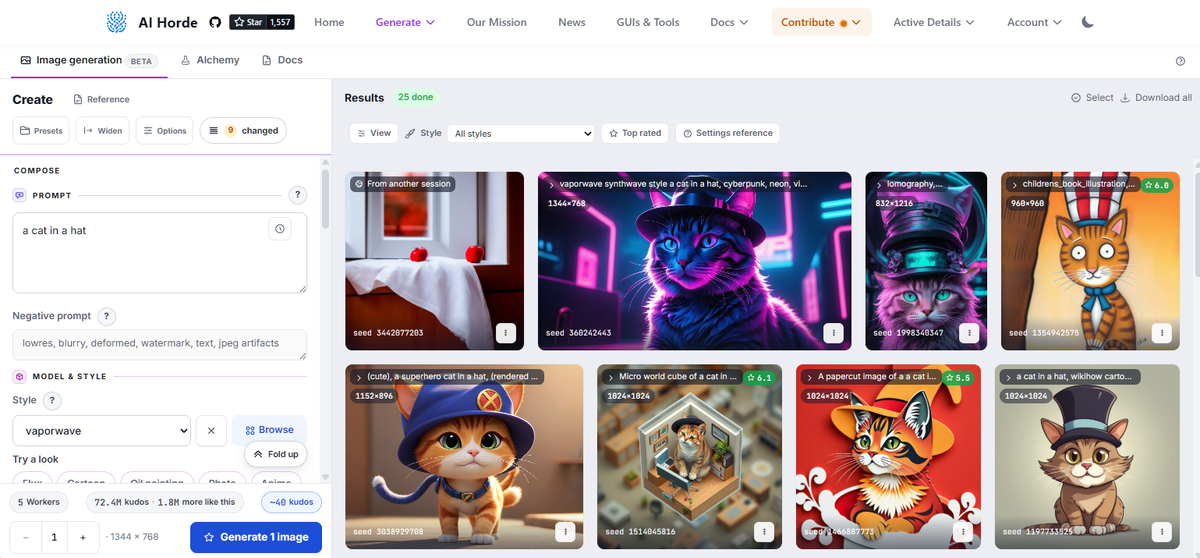
As of today, aihorde.net has an image generation studio and an alchemy studio at aihorde.net/generate, and a documentation area at aihorde.net/docs where every setting is explained, including with representative pictures when applicable. Part of the reason for building it myself was to use our own API the way an integrator would, and to fix what that turned up. I will be honest that it took considerably longer than I planned. Like everything else we offer, it is free to use, it runs on volunteer workers, and it was built on donated time.
The image studio
I built the studio so that you have a better idea of what will be submitted before you do so. The kudos cost and the likely wait are shown before you press Generate. The studio knows which models are being served and by how many workers, so if nobody is offering the model you picked, or the requested size is beyond what those workers can do, it tells you which setting to change. If the horde refuses a request, the reason appears near the setting that caused it. Active generations utilize new request status fields as well as tracking worker availability and worker capability in real time. This gives a much clearer picture of what is happening with your request as it progresses and there are explanations for a variety of circumstances.
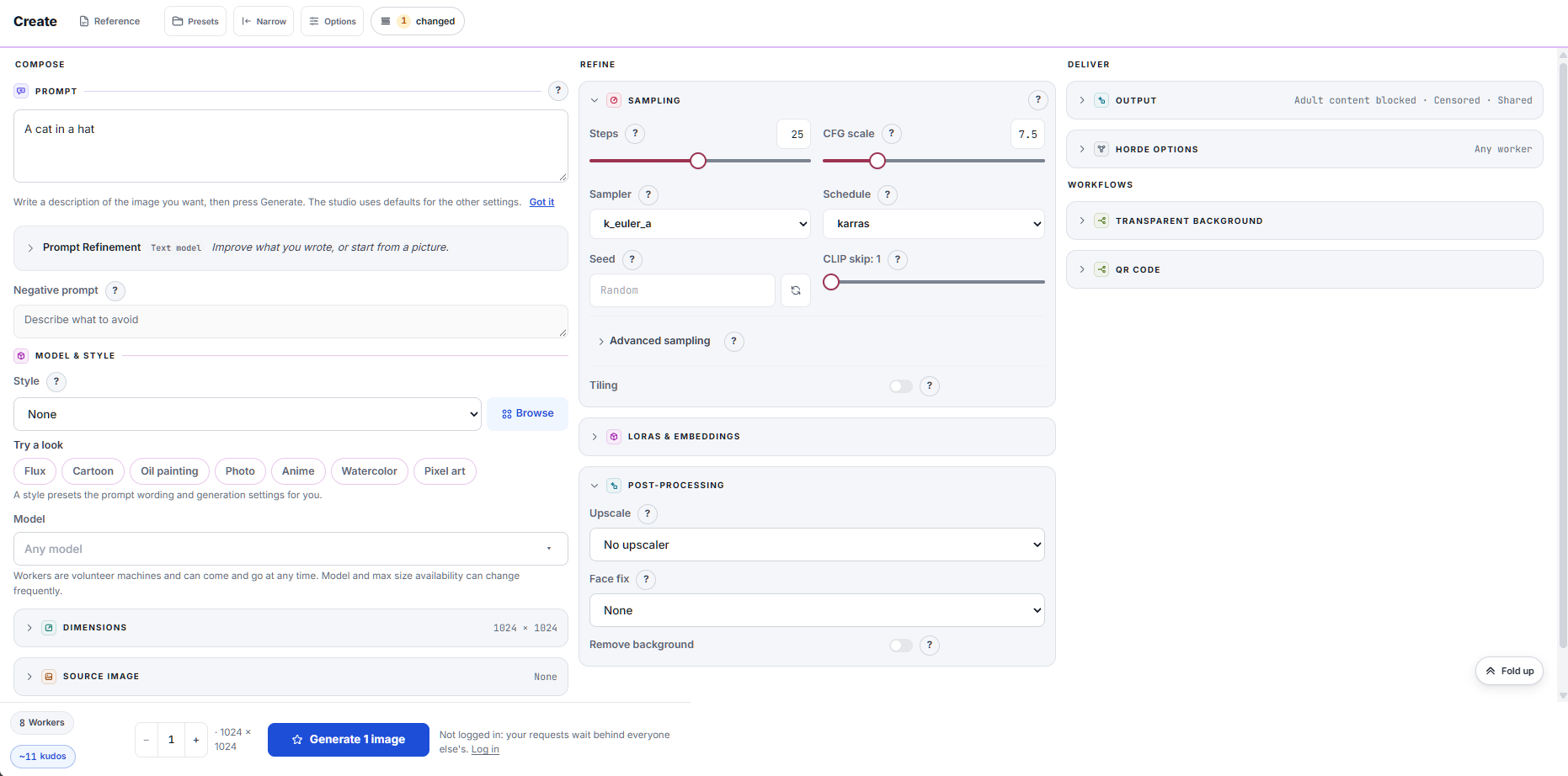
A counter tracks everything you have changed from the defaults and can put any of it back. Folded groups show a one-line summary of their settings, so a new user can work from the summaries alone and an experienced one opens only what they need. You can see the exact request before it is sent and there is an option to always pop up a "request review" before sending. The generation settings used to make a picture are stored inside every image you download, so you can drop a downloaded image back in and its settings come up for review.
This is a bit of a long post, so I want to ask you now: Are AI-Horde services part of your workflow? Do you believe in our mission of free access to AI technologies? We run entirely on donations and volunteer effort. If you can, please consider supporting us. Regular monthly contributions, even just a dollar a month, are the best way to support our mission.
The documentation
In my experience most AI tools explain their settings briefly, if at all, and most people learn image generation by trial and error, or from advice passed around that may or may not have been true for the model in front of them. I wanted a reference where you can see what a setting does instead of being told. Every setting in the studio opens a short note in place, and the note leads to a page in the docs where the same prompt and seed were rendered across the setting's range, wherever that is possible, so you can compare the effect of changing it with your own eyes.
There are 173 image comparisons and just under three thousand frames, every one generated with the horde's own worker software, and the request that produced it can be seen by clicking the "Details" button.
I plan to expand the number of variations shown in the future, so users can get an even better sense of how different settings work under a wider variety of cases.
Tutorials
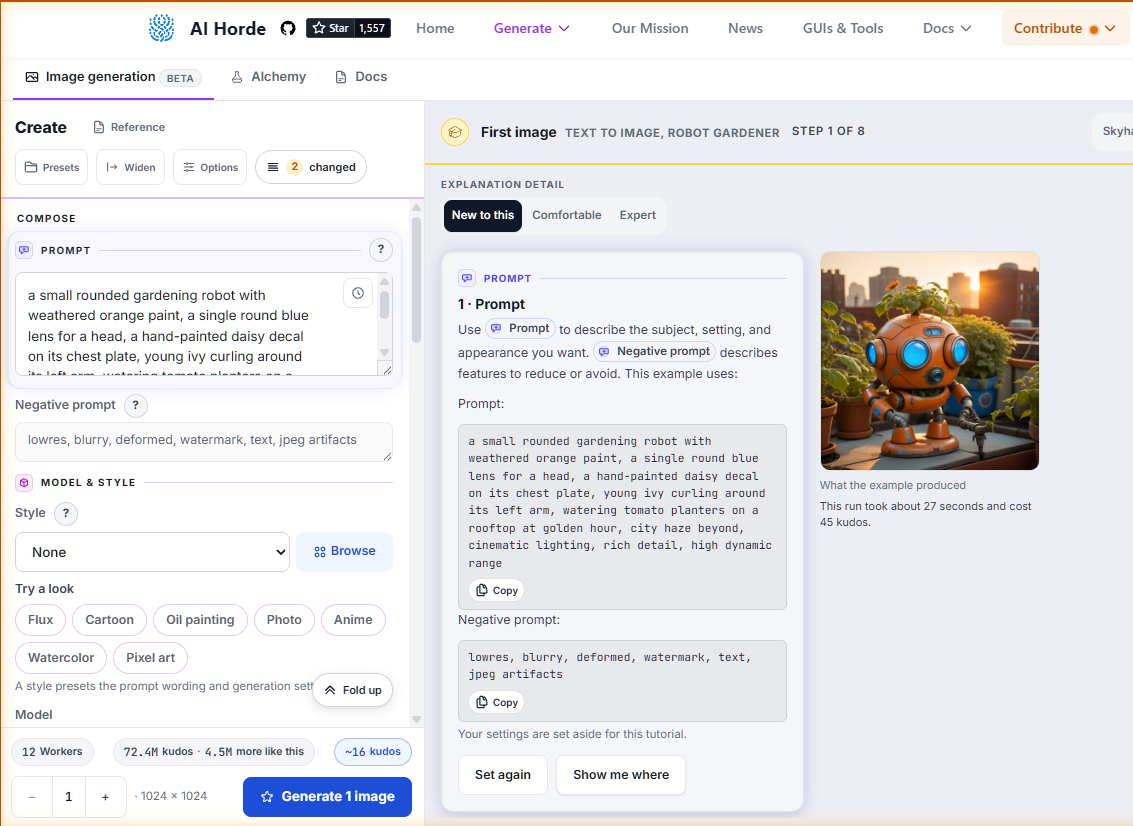
The docs also hold guided tutorials that run inside the studio. Each one fills in a setting in front of you and explains why. There are seven so far: text to image, image to image, inpainting, ControlNet, remix, transparent backgrounds and QR codes. Each can be read at three levels of detail, and your browser remembers which ones you have finished. There are also three short reads for background on the technologies in play: how image models work, how the horde works, and where things are if you are coming from another tool.
New models
The studio also makes the newer model families usable. Qwen-Image, Z-Image Turbo, Anima Turbo and Krea2 Turbo all arrived on the horde in the past several months, in beta. Each has particular recommended settings: Z-Image Turbo runs at around nine steps with a CFG/guidance of one. Qwen-Image wants between twenty and forty steps with CFG/guidance no higher than 2.5. Anima Turbo wants eight to twelve steps and Krea2 Turbo prefers eight, and both run only on er_sde, one of the samplers the new sampler contract makes available. The studio reads those settings from the model reference and suggests keeping the selected values within them, so a request for one of these models is more likely to turn out well and not be refused.
Licensing and other details
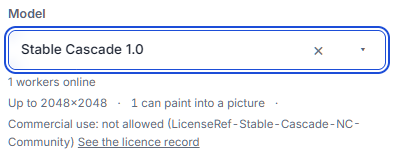
Qwen-Image and Z-Image Turbo are Apache 2.0, Anima Turbo is non-commercial, and Krea2 Turbo carries Krea's community license.
The studio makes a best effort to indicate what you may do with the resulting picture. The model, the control type and the post-processors each carry their license, with a link to the record on reference.aihorde.net, and there is a note beside Generate when an asset forbids commercial use. Developers can use the new model reference API to get licensing and other details programmatically.
If you generate from a phone and a desktop, or reload in the middle of a job, the results from every session appear in the same grid. Results are kept in your own browser, and a storage page lets you see and clear what is there.
The source image editor
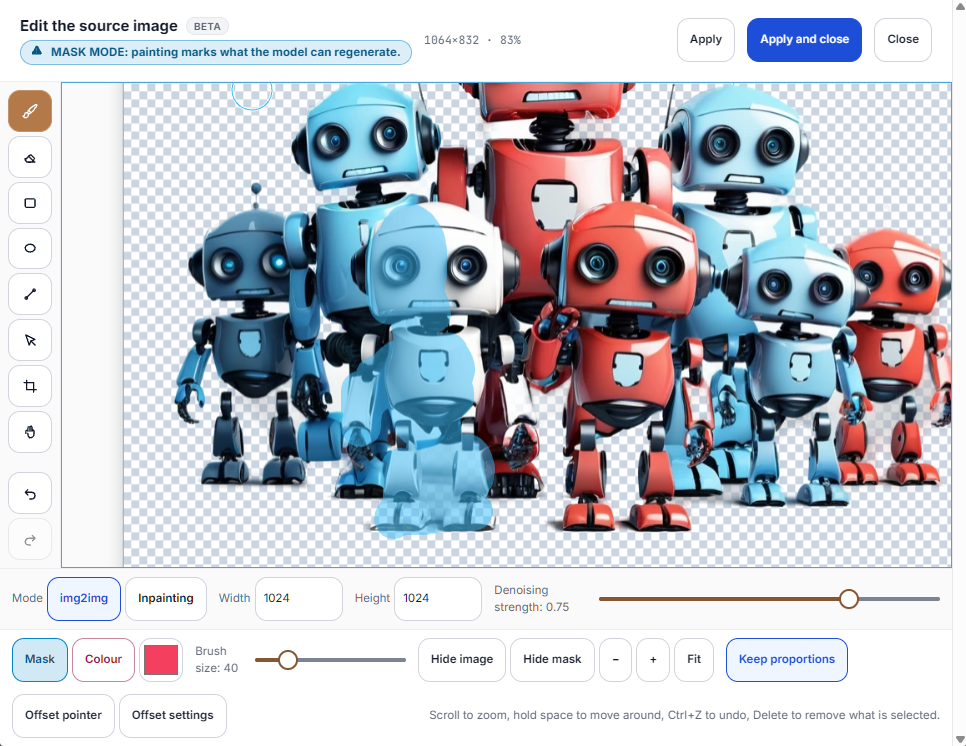
The white robot, partially masked (transparent light-blue color) with the new editor.
Historically, there have been varying degrees of support for the generation kinds that require a source image (or image as input), such as image to image, controlnet, inpainting, and remix. The studio provides a consistent interface for all of these modes, with a web-based image editor that allows you to paint masks, extend the canvas for outpainting, crop, or start from a blank page and sketch.
The editor works on both desktop and mobile devices, and has been tested across various use cases. I am hoping that this will improve the overall user experience and make these advanced generation modes more accessible to everyone. However, more advanced image editing features, such as layer management and complex masking, are not supported. Power users should still continue to use external tools for those tasks.
Alchemy
The alchemy page I added alongside the reGen v17 release was a simple demonstration. Until now, the only alchemy most people could reach was the original handful: caption, tags, and a few upscalers and face fixers. The v17 worker added vectorize, describe, palette and aesthetic scoring, six new upscalers, two new face fixers, and control map annotation, which turns any picture into any of the thirty-three control map types. All of it is in the new alchemy studio, which speaks in terms of what you want rather than what the API calls things: describe an image, make a control map, enlarge, fix faces, cut out the background.
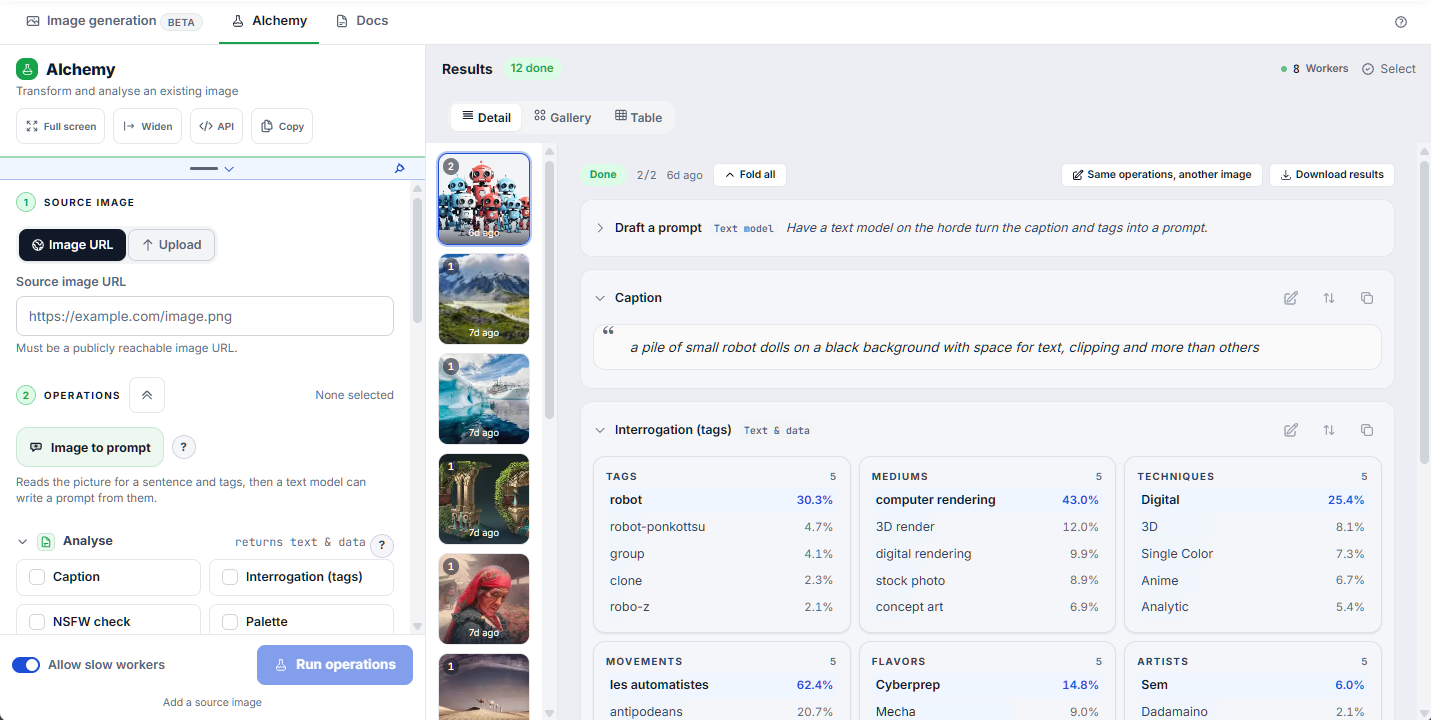
All twenty-four forms have an example in the docs, fifty-six examples in all, and any result can be sent straight to the image studio as its source image. The queue keeps running when you navigate away, and alchemy keeps its own storage, so its history is not at risk from an image session going wrong. However, you still need to open the generate web page at least once within 20 minutes of your generation being completed, or it will be lost.
Developer notes
Three backend changes are, as of this post, new for anyone maintaining a client:
- Samplers, schedulers and annotation exposes forty-one samplers and eleven schedulers with their solver controls, thirty-three control map types, and the
annotationalchemy form.- Pricing now follows the work a sampler actually does.
heunpp2andseeds_3run three model passes per step and cost three times a plain step, andk_heun,k_dpm_2andk_dpmpp_sderun two. - The full contract is published at
GET /api/v2/status/sampler_constraints, generated from the same definitions the horde validates against, so a client no longer has to keep its own copy.
- Pricing now follows the work a sampler actually does.
- Control strength is accepted on image requests and gated on reGen 18 workers.
- The request status endpoints now carry
is_possible,eligible_workers,eligible_worker_threadsandmight_stall, explained here.
Getting here
This has taken many weeks of development, testing, and iteration. It may come as no surprise that these changes to the website were AI-assisted, and that certainly helped speed up many aspects of the process. However, there were many hand-crafted elements and careful considerations that took me a significant amount of time and attention to get right.
I am calling it a beta. A first release of something this size will have rough edges I could not find on my own, and I would rather hear about them than have you work around them. If a page says something wrong, or a control does not do what its note says, tell me on Discord or open an issue on GitHub. Expect the studio and the docs to keep changing for a while as that feedback comes in.
In closing
As usual, I would like to emphasize that our mission is to provide generative AI and other frontier technologies to the public, free of charge. We can only do this through volunteer effort and donations. Frontends are only as useful as the horde behind it, and the horde is made of people choosing to run workers for strangers and by people writing free and open-source software. We understand that there is effort and real cost in running workers, and we appreciate everyone who does.
Your support is critical in making the AI-Horde project continue to be a sucess. If you have not looked into it lately, running an image worker is now a one-click installer or a one-line command (link is to the v18 beta channel). If you have the ability, donations keep the servers running.
I hope the new studios, documentation and other added features make the horde easier to use and easier to understand.